Visual Studio extension
DotGram.VisualStudio provides language support for standalone .gram files and
DotGram grammars embedded in C# GramAttribute strings.
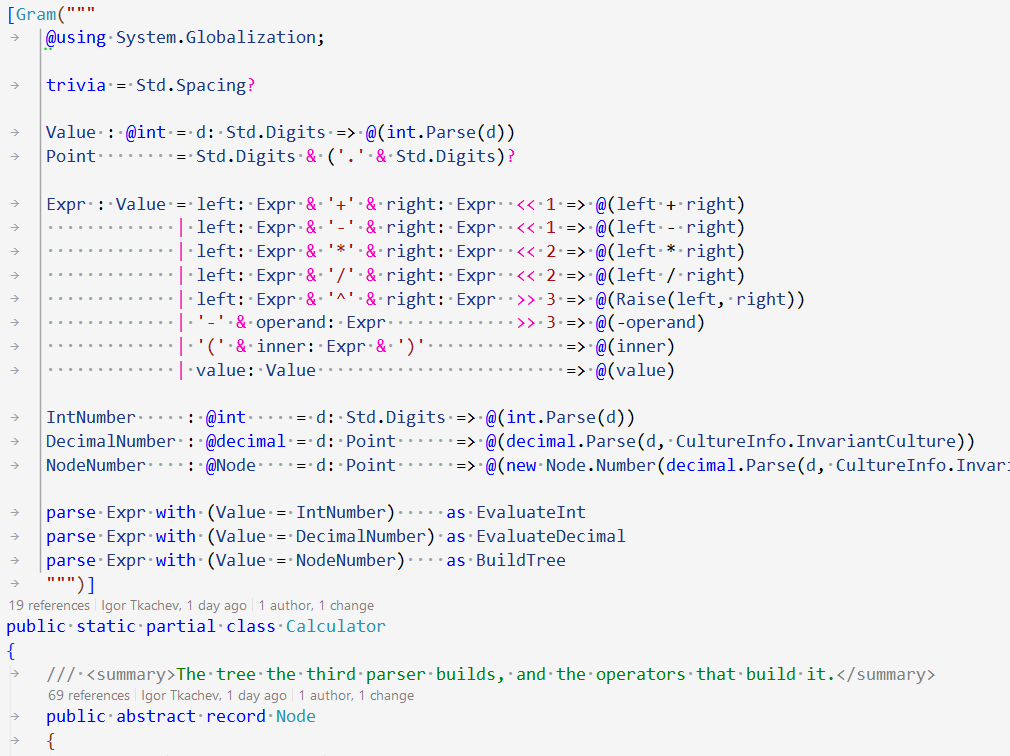
An API that accepts DotGram source text directly can opt a string parameter into the same tooling with the standard annotation:
using System.Diagnostics.CodeAnalysis;

void Inspect([StringSyntax("DotGram")] string grammar);
void InspectFileSyntax([StringSyntax(".gram")] string grammar);
Both syntax names are equivalent. String literals passed to either parameter receive DotGram classification, diagnostics, Quick Info, completion, signature help, Go To Definition, Find All References, reference highlighting, Rename, brace matching, folding, and a rule navigation list. This annotation marks the DotGram grammar notation itself.
For a generated DSL, use the identifier declared by its parser host:
[Gram("Filter.gram")]
[GramLanguage("filter")]
public static partial class FilterLanguage;

void Execute([StringSyntax("filter")] string query);
The extension resolves the StringSyntax value to the matching GramLanguage
descriptor. Calls to generated parser publication methods are recognized directly from
their parser host and publication metadata.
The same annotation works on the receiver parameter of an extension method and on a field or property initializer:
using System.Diagnostics.CodeAnalysis;

public static class Filters
{
    [StringSyntax("filter")]
    public const string DefaultFilter = "status = active";

    public static string AsFilter([StringSyntax("filter")] this string text)
    {
        return text;
    }

    public static string Active()
    {
        return "status = active".AsFilter();
    }
}
Only the immediate literal receiver or initializer is classified. Values are not propagated through variables, and later assignments to an annotated field are ignored.
A grammar that includes others
A standalone .gram file whose class writes [GramInclude(typeof(…))], or derives from a class
with a grammar, is read the way the generator compiles it: the included grammars are spliced on
after it, and the options of the host's attribute apply. The included grammars are found through the project,
so the editor follows the project as it changes: when the host's declaration, an included
.gram file (open and being edited, or saved), the project's references or the solution change,
the host is looked for again and the grammar is analysed again if what it is compiled with
changed. Changes in projects that neither hold the grammar nor declare what it includes are
ignored. Until the host is first found, names that depend on an include are not reported as
missing; after a while without a host the grammar is reported as it stands, and is reported
again the moment the host appears.
Go To Definition on a name from an included grammar — one brought in by using, qualified
(Sql92.Word) or qualified more deeply (Sql92.Lexical.Digits) — opens the included file at
the rule. A grammar included from a referenced assembly has no file, only the text its class
carries; that text opens as a read-only copy under the temporary directory. Find All References
lists the uses in the included grammars beside those in the open file. Rename is not offered for
a rule an included grammar declares or uses, since the edit would have to reach a file the
buffer does not own.
The standard library and the words of the notation
The standard library (Std, docs/syntax.md §5.2) is no file of the project, yet a grammar names
it: Std. offers its rules, and Std.Name has Quick Info, signature help and Go To Definition,
which opens a read-only copy of the library the generator carries. Quick Info describes every
keyword, built-in rule, symbol and Unicode category, and the names a parser supplies
(parserText, parserSpan, …); inside @(…) and among an @Name(…) call's arguments those
names, as many as the construction, the when or the recovery's factory is handed, and the rule's
captures and parameters, are offered by completion beside what C# offers.
What the editor says about these comes from src/DotGram/Language/GramVocabulary.cs. The
tests in tests/DotGram.Language.Tests, which run on any machine, hold it to the generator:
EditorVocabularyTests to the words the parser takes, the built-in rules, the supplied names,
the token kinds, the Unicode categories and the standard library; EditorSuppliedNamesTests to
what the generated C# accepts of each supplied name in each place; EditorDiagnosticsTests to
every diagnostic number, each with a grammar the editor shows it for or the reason it cannot
(EditorDiagnostics.txt); and, in tests/DotGram.Language.Tests.Slow, EditorCorpusTests to
every grammar in the repository, every token of which must be classified, and
EditorParityTests to the compiler's diagnostics for each under the same options. What each
feature answers on the playground grammars — completion, Quick Info, signature help,
navigation, references, rename — is recorded in tests/DotGram.Language.Tests/Playground, and
PlaygroundSnapshotTests holds the shared providers to it on any machine.
A grammar is analysed whole, the compiler included, shortly after typing pauses. How long that
took is recorded with each analysis but not shown — the extension has no pane for it and logs
only errors to the activity log; EditorAnalysisCostTests in tests/DotGram.Language.Tests.Slow
reports it, phase by phase, for the largest grammars in the repository.
Build the VSIX
The extension compiles the shared language core — src/DotGram/Grammar/ and
src/DotGram/Language/ — from source, through src/DotGram/Language.projitems, and holds only
what is Visual Studio's itself: taggers, completion sources, command handlers and the rest that
map the core's answers onto the editor. What may go where, and why it is sources rather than a
reference to the generator, is src/DotGram/Language/README.md. The core's own tests are in
tests/DotGram.Language.Tests and run on Linux; tests/DotGram.VisualStudio.Tests keeps those
that need a type of the extension's: PlaygroundAdapterTests holds the extension's adapters to
the same recorded answers, on Windows.
From the repository root:
dotnet build src/DotGram.VisualStudio/DotGram.VisualStudio.csproj -c Release
The installable package is written to:
.build/bin/DotGram.VisualStudio/release/DotGram.VisualStudio.vsix
Install
Close Visual Studio, then open DotGram.VisualStudio.vsix in File Explorer or run:
& "C:\Program Files\Microsoft Visual Studio\18\Enterprise\Common7\IDE\VSIXInstaller.exe" `
  ".build\bin\DotGram.VisualStudio\release\DotGram.VisualStudio.vsix"
Select the Visual Studio instance in the installer and restart Visual Studio after
installation. The package targets [17.14,19.0) in source.extension.vsixmanifest: Visual
Studio 2022 from 17.14, its last minor version, and Visual Studio 18.
To update a local installation, build a package with a higher Version in
Directory.Build.props — the extension has no version of its own and takes the
repository's, which the GetVsixVersion target hands to the manifest — then run the new
VSIX. Visual Studio identifies updates by the stable DotGram.VisualStudio extension ID.
The .gram file icon
.gram files take their Solution Explorer icon from DotGram.VisualStudio.Icon.pkgdef, whose
ShellFileAssociations entry names an image in DotGram.VisualStudio.imagemanifest. That image is
a pack URI into DotGram.VisualStudio.dll, and Visual Studio reads it whenever it rebuilds its
image cache (ImageLibrary in the instance's local folder): at install time, and at startup when
the cache is missing or out of date. The startup rebuild finds an extension's assembly only through
the binding paths the extension registers, so the same pkgdef registers the extension's folder as
one. Without it the icon survived an install but not the next rebuild Visual Studio made itself,
and every .gram file showed no icon until the extension was installed again.
Verify
Open the files in tests/DotGram.VisualStudio.Tests/Playground/:
VisualStudioToolingPlayground.cs, with grammars embedded in attributes and the
StringSyntax checks; VisualStudioToolingPlayground.gram, a standalone grammar, and
VisualStudioToolingPlayground.gram.cs, the class it is attached to; and ToolingQuery.gram,
the DSL those StringSyntax checks are written in. They are compiled by that project, so
the editor has a real compilation behind them, which is half of what is being checked. The
comments beside each grammar rule describe the manual checks and their expected results.
When the generator disappears from the editor
The sign: in Solution Explorer, Dependencies → Analyzers → DotGram of a project that references the
generator is empty, [Gram] is underlined with CS0246 (GramAttribute could not be found), the
generated parsers are unknown names, and the grammar string loses its colouring — while a build from
the command line, and the Error List of that build, are clean. Rebuild changes nothing; closing and
reopening the solution changes nothing.
What is behind it: Visual Studio does not run the generator from .build/bin/DotGram/…/DotGram.dll
itself. Roslyn copies every analyzer to a shadow directory under %TEMP%\Roslyn\AnalyzerPathResolver
and keeps the copy in a cache there, filed by the original path, the assembly's MVID and its size. The
editor reacts to a change of the file at once, so when a build rewrites the generator in place it can
take a half-written copy, and the generator fails to load for that session. Builds here are
deterministic, so a later build of the same sources has the same MVID and size, and the cache can keep
serving a copy it took earlier under that unchanged key — whatever is done to the output, Rebuild
included; deleting the cache recovers.
Since 0.3.0 the generator's own build puts DotGram.dll in place by an atomic replace rather than a
copy, so the editor sees either the previous file or the whole new one (PlaceGeneratorByRename in
src/DotGram/DotGram.csproj). A cache filled earlier is not repaired by that: close every Visual
Studio, delete %TEMP%\Roslyn\AnalyzerPathResolver, and open the solution again. If the folder will
not delete, end the ServiceHub* and DevHub processes first — they can outlive the Visual Studio
that started them. The directory is only a cache; Roslyn recreates it. The same recovery applies to
any analyzer or generator whose output is rewritten in place while the editor has the solution open.